



Introduction
Have you ever wondered how people verify cryptocurrency transactions on a blockchain?
Unlike a traditional bank account, where transaction records are kept private by the bank, blockchain networks are public. Anyone can view transactions, wallet activity, and network information using a tool called a blockchain explorer.
A blockchain explorer works like a search engine for blockchain data. It helps users find transaction details, wallet balances, token information, and much more. Whether you’re sending Bitcoin, receiving Ethereum, or researching a crypto project, a blockchain explorer is one of the most useful tools you can learn to use.
What Is a Blockchain Explorer?
A blockchain explorer is a website or tool that allows users to search, view, and verify information stored on a blockchain. Think of it like Google for blockchain data. Just as Google helps you find websites, a blockchain explorer helps you find transactions, wallet addresses, blocks, and other blockchain information.
Blockchain explorers provide a user-friendly way to access blockchain records without requiring technical knowledge. They make blockchain data easy to understand by organizing complex information into searchable pages.
Real-World Example:
If a friend says they sent you 0.5 ETH, you can use a blockchain explorer to verify whether the transaction was actually sent and received.
Blockchain vs Blockchain Explorer
Many beginners confuse a blockchain with a blockchain explorer. Although they are closely related, they serve different purposes.
| Blockchain | Blockchain Explorer |
|---|---|
| Stores transaction data | Displays transaction data |
| Network infrastructure | Search and viewing tool |
| Runs on blockchain nodes | Connects to blockchain nodes |
| Records transactions | Helps users find transactions |
Think of a blockchain as a giant library full of books. A blockchain explorer is the catalog system that helps you quickly find a specific book.
What Does a Blockchain Explorer Do?
A blockchain explorer allows anyone to access publicly available blockchain information. Instead of reading raw blockchain data, users can view information through a simple interface that organizes transactions, wallets, blocks, and network activity.
Blockchain explorers are commonly used to verify payments, monitor wallet activity, analyze token transfers, and research blockchain networks. They serve as an important transparency tool within the cryptocurrency ecosystem.
Some of the information available through a blockchain explorer includes:
- Transactions
- Wallet addresses
- Token transfers
- Smart contracts
- Block information
- Network activity
- Gas fees
- Validator or miner information
Real-World Example:
A Bitcoin explorer can show who sent Bitcoin, who received it, how much was transferred, when it happened, and whether the transaction has been confirmed by the network.
Why Are Blockchain Explorers Important?
Blockchain explorers make blockchain networks transparent and easy to verify. Because blockchain data is public, explorers provide a convenient way for users to inspect transactions and confirm activity independently.
Without blockchain explorers, users would have no easy way to check whether a payment was successful or whether a transaction had been confirmed on the network.
Key Benefits:
- Verify crypto payments
- Check wallet balances
- Monitor network activity
- Research tokens
- Investigate suspicious transactions
- Learn how blockchain technology works
Real-World Example:
Suppose a cryptocurrency exchange says your withdrawal is still processing. Instead of waiting and guessing, you can search the transaction hash in a blockchain explorer and see the exact status of the transaction.
What Information Cannot Be Seen in a Blockchain Explorer?
Although blockchain explorers provide a large amount of public information, some important details remain private and cannot be viewed by anyone.
- Private keys
- Wallet passwords
- Seed phrases
- Personal account credentials
- Exchange login information
Anyone can view wallet activity and transactions, but nobody can access funds without the wallet’s private key.
Popular Blockchain Explorers
Different blockchains have their own dedicated explorers. These tools allow users to search transactions, wallet addresses, blocks, smart contracts, and network activity on a specific blockchain. Using the correct explorer is important because a Bitcoin explorer cannot display Ethereum transactions, and vice versa.
1. Bitcoin Explorer (Blockchain.com Explorer)
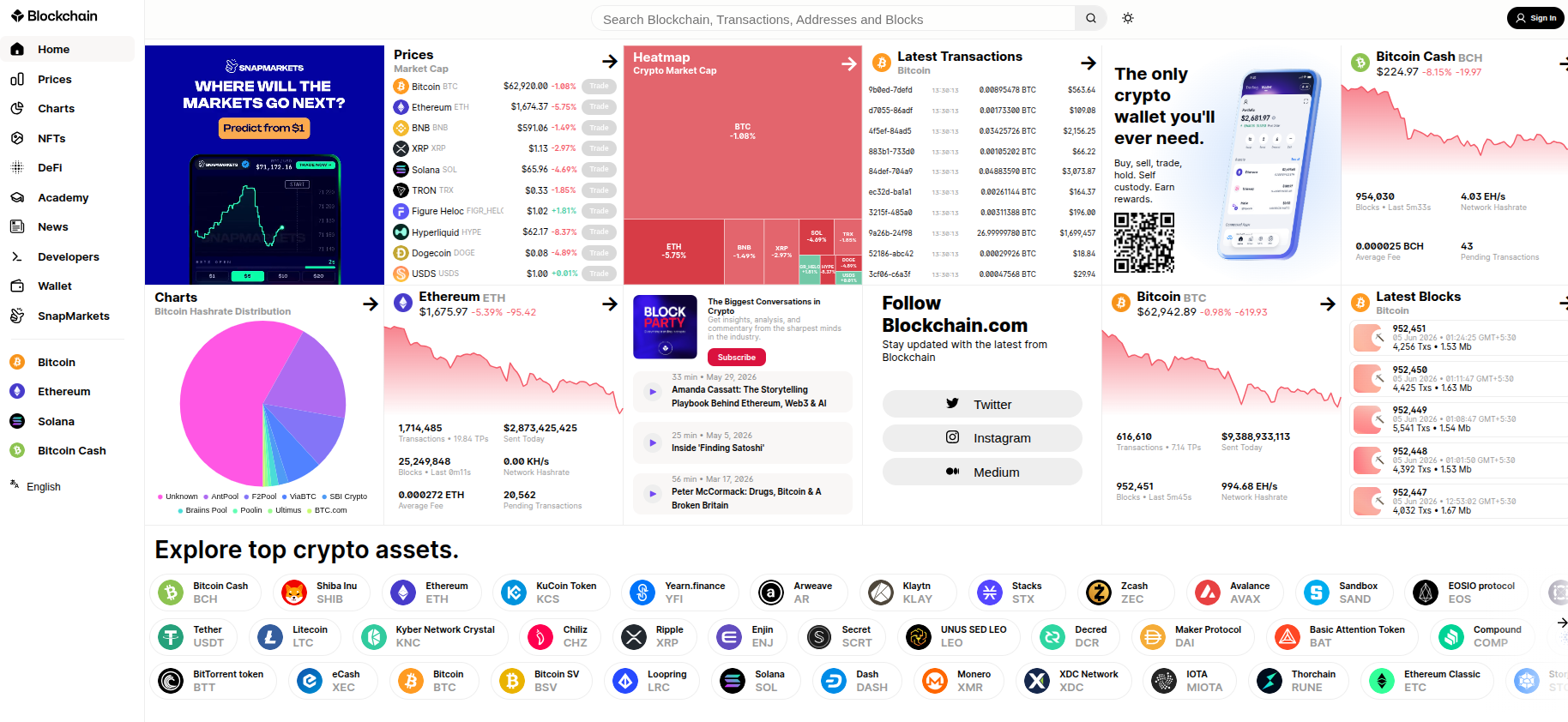
Blockchain.com Explorer is one of the most widely used blockchain explorers for the Bitcoin network. It allows users to search Bitcoin transactions, wallet addresses, blocks, and network statistics in real time.
What You Can Do:
- Track Bitcoin transactions
- Check wallet balances
- View block information
- Monitor network activity
- Verify payment confirmations
For example, if someone sends you Bitcoin, you can paste the transaction hash into Blockchain.com Explorer to verify whether the payment has been confirmed.
2. Ethereum Explorer (Etherscan)
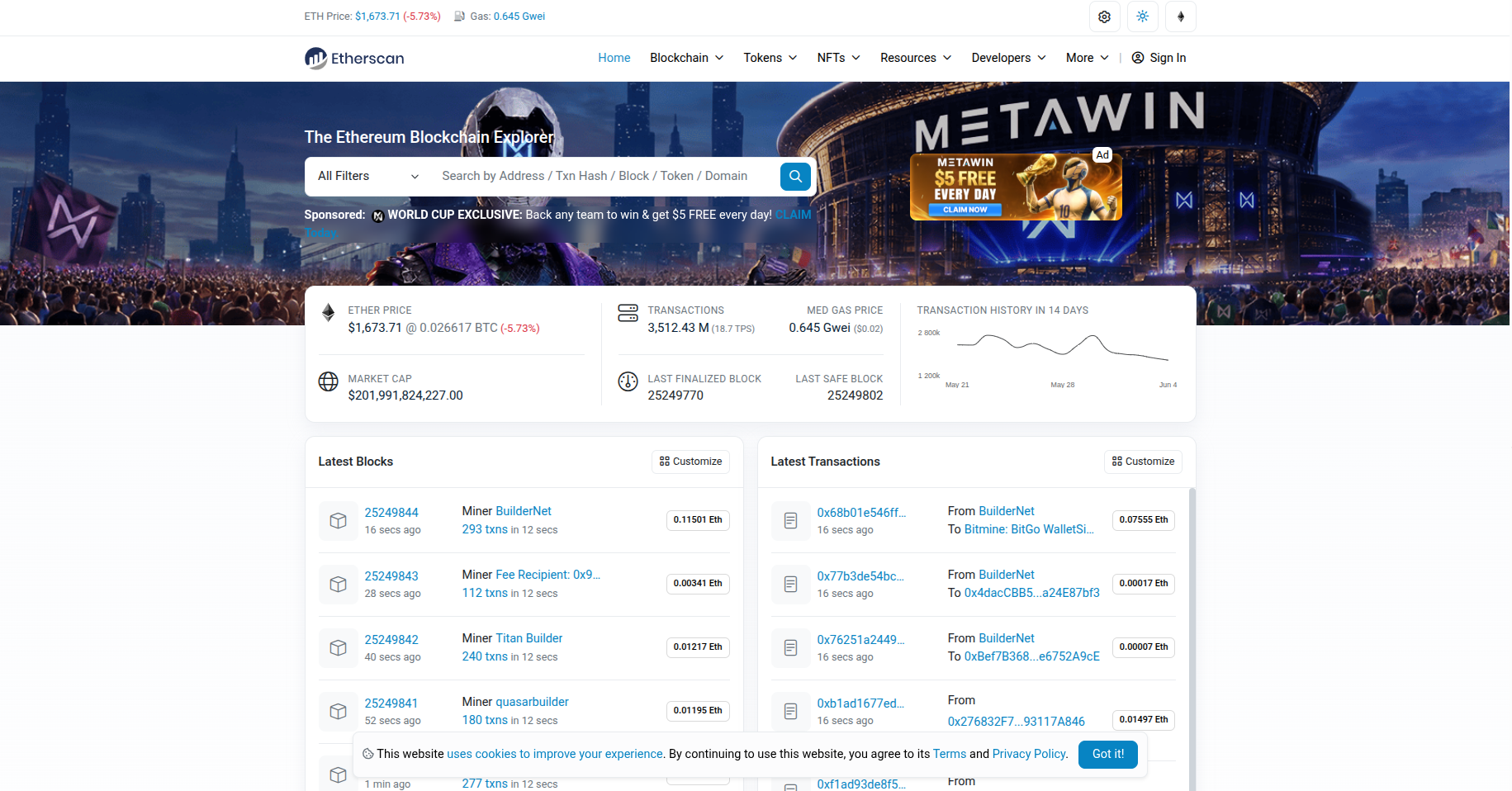
Etherscan is the most popular blockchain explorer for Ethereum. It provides detailed information about ETH transactions, ERC-20 tokens, NFTs, smart contracts, and gas fees.
What You Can Do:
- Track ETH transactions
- View wallet balances
- Analyze ERC-20 tokens
- Explore NFT transfers
- Verify smart contracts
- Monitor gas fees
If you purchase an NFT on Ethereum, Etherscan allows you to verify the NFT transfer and ownership details directly on the blockchain.
3. BNB Chain Explorer (BscScan)
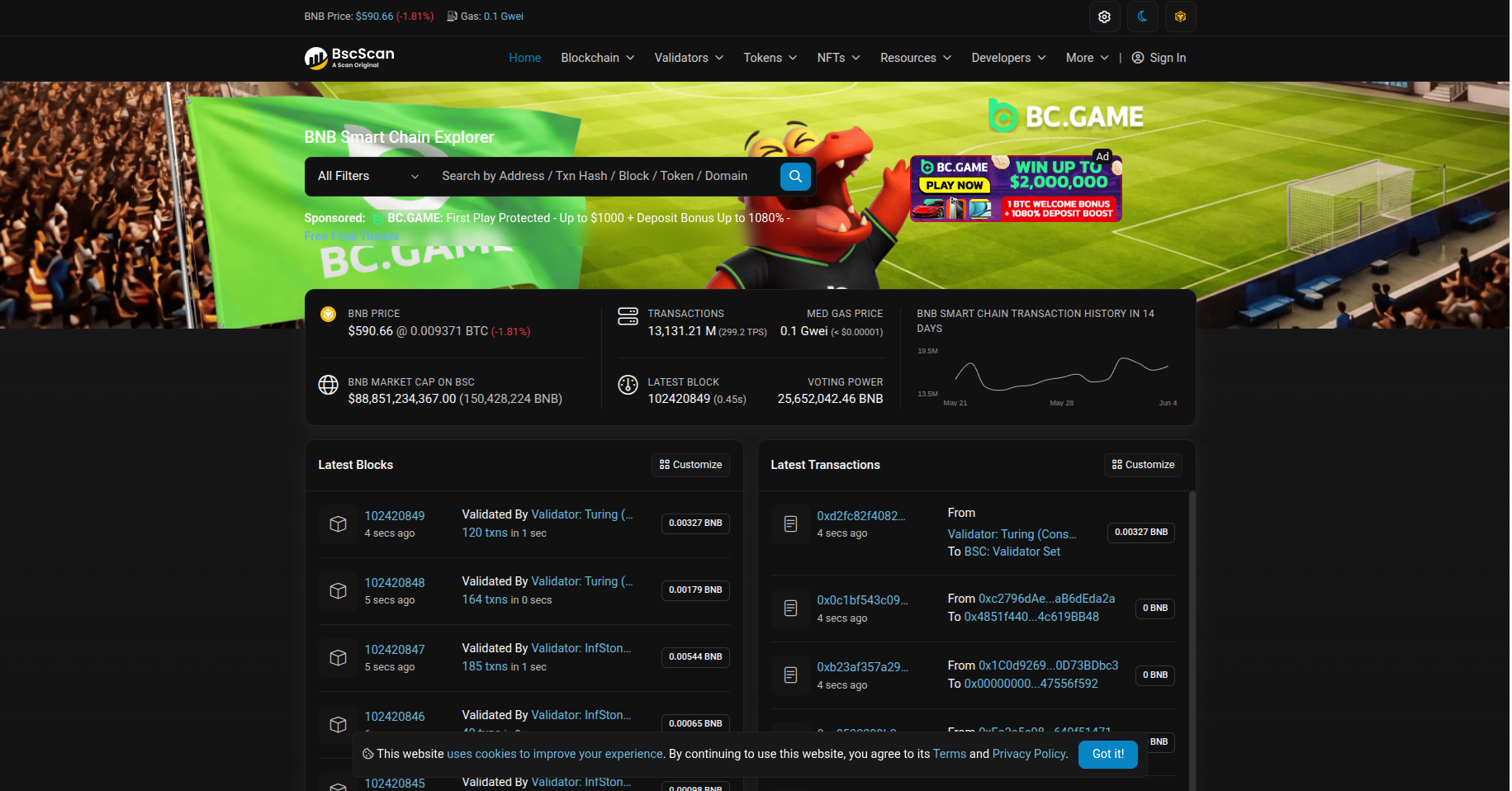
BscScan is the official explorer for BNB Chain. It functions similarly to Etherscan but focuses on BNB transactions, BEP-20 tokens, and decentralized applications built on BNB Chain.
What You Can Do:
- Track BNB transfers
- Monitor BEP-20 tokens
- Verify smart contracts
- Analyze DeFi activity
- View validator information
4. Solana Explorer (Solscan)
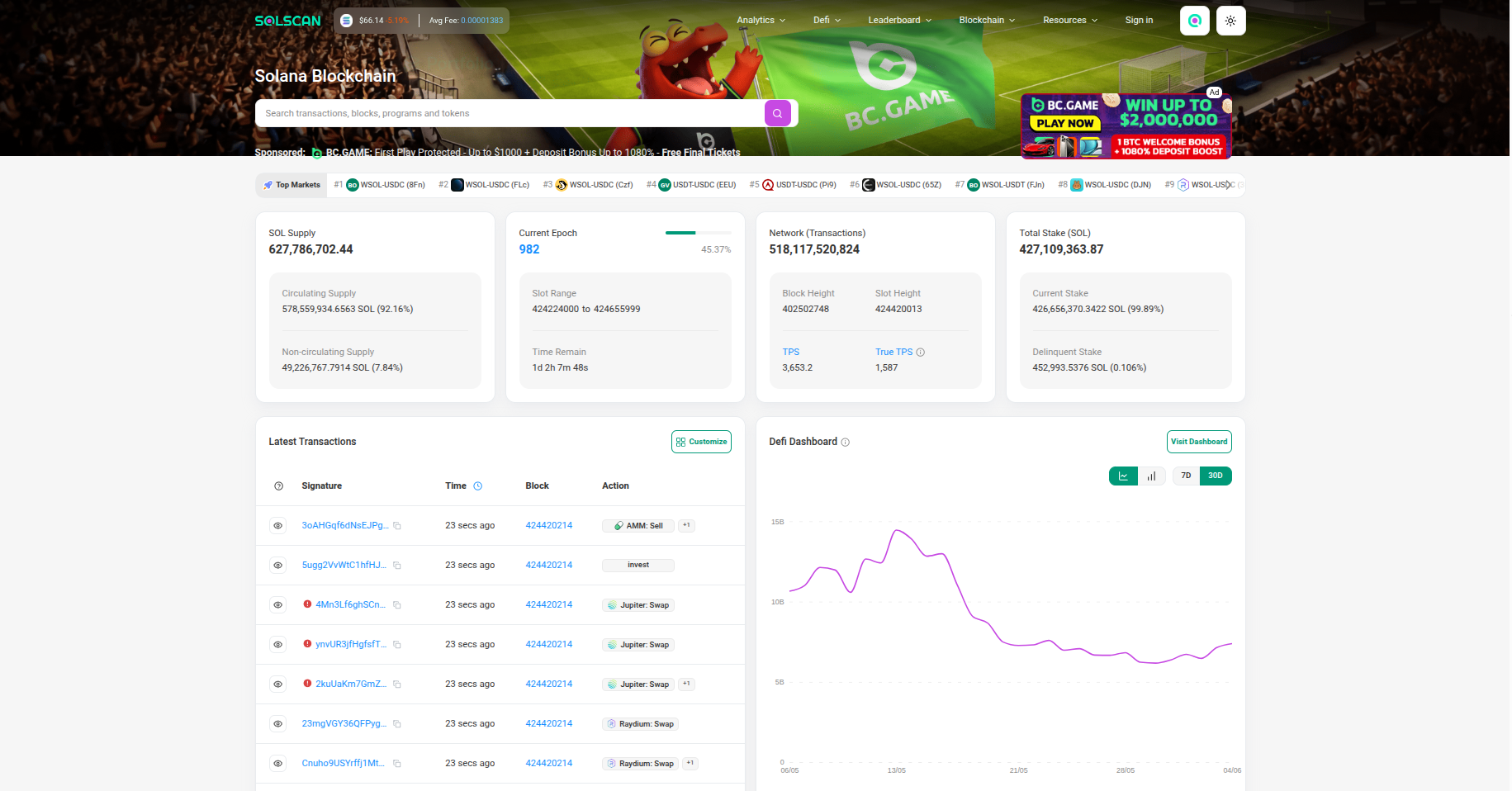
Solscan is one of the most popular explorers for the Solana blockchain. It provides insights into SOL transactions, staking activity, token transfers, NFTs, and validator performance.
What You Can Do:
- Track SOL transactions
- Monitor staking rewards
- View NFT activity
- Analyze token transfers
- Check validator statistics
5. Polygon Explorer (PolygonScan)
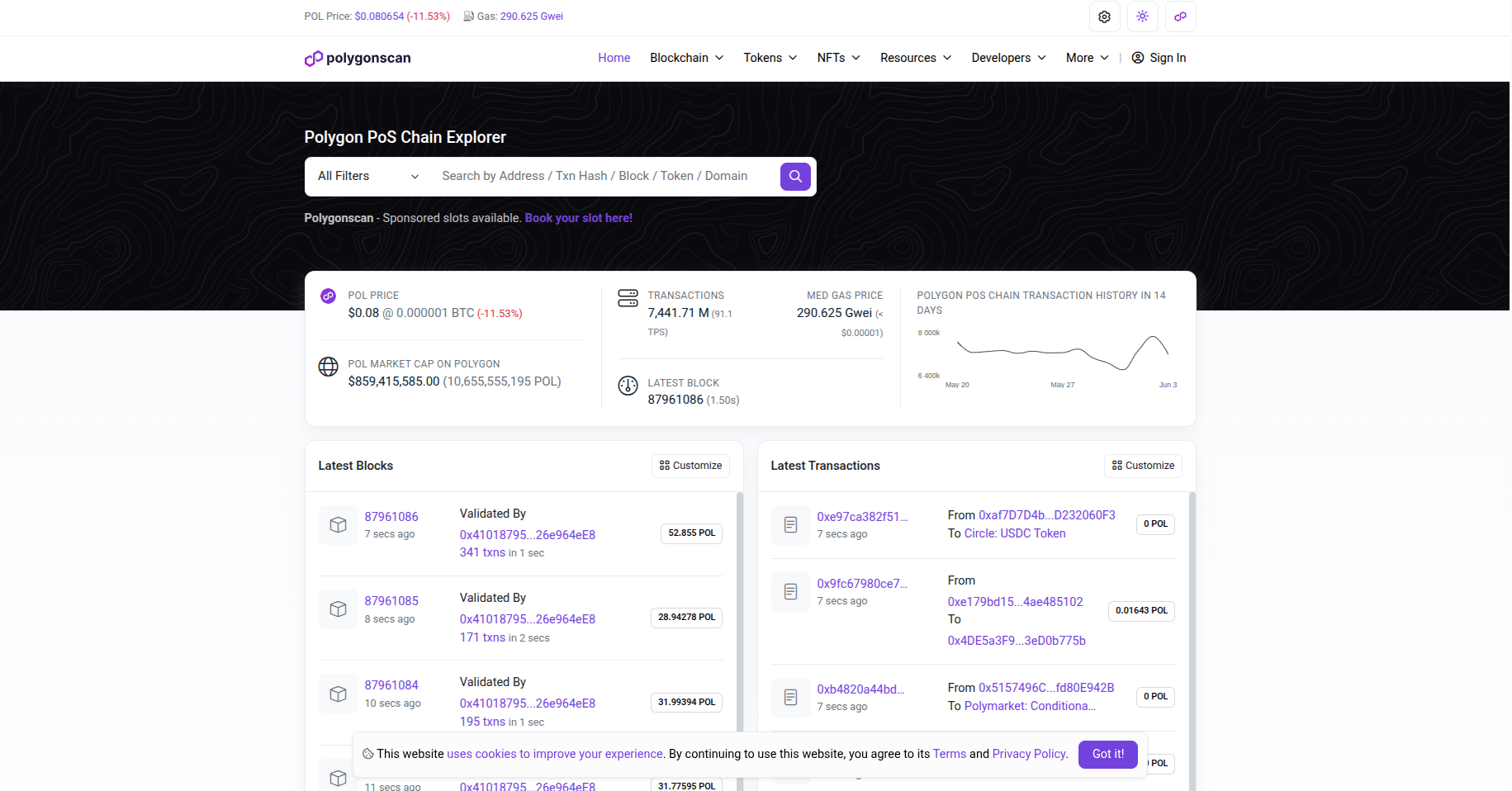
PolygonScan is the primary explorer for the Polygon network. It helps users track MATIC transactions, NFT activity, token transfers, and smart contract interactions.
What You Can Do:
- View MATIC transactions
- Track Polygon NFTs
- Analyze token transfers
- Verify smart contracts
- Monitor network activity
6. Avalanche Explorer (SnowTrace)
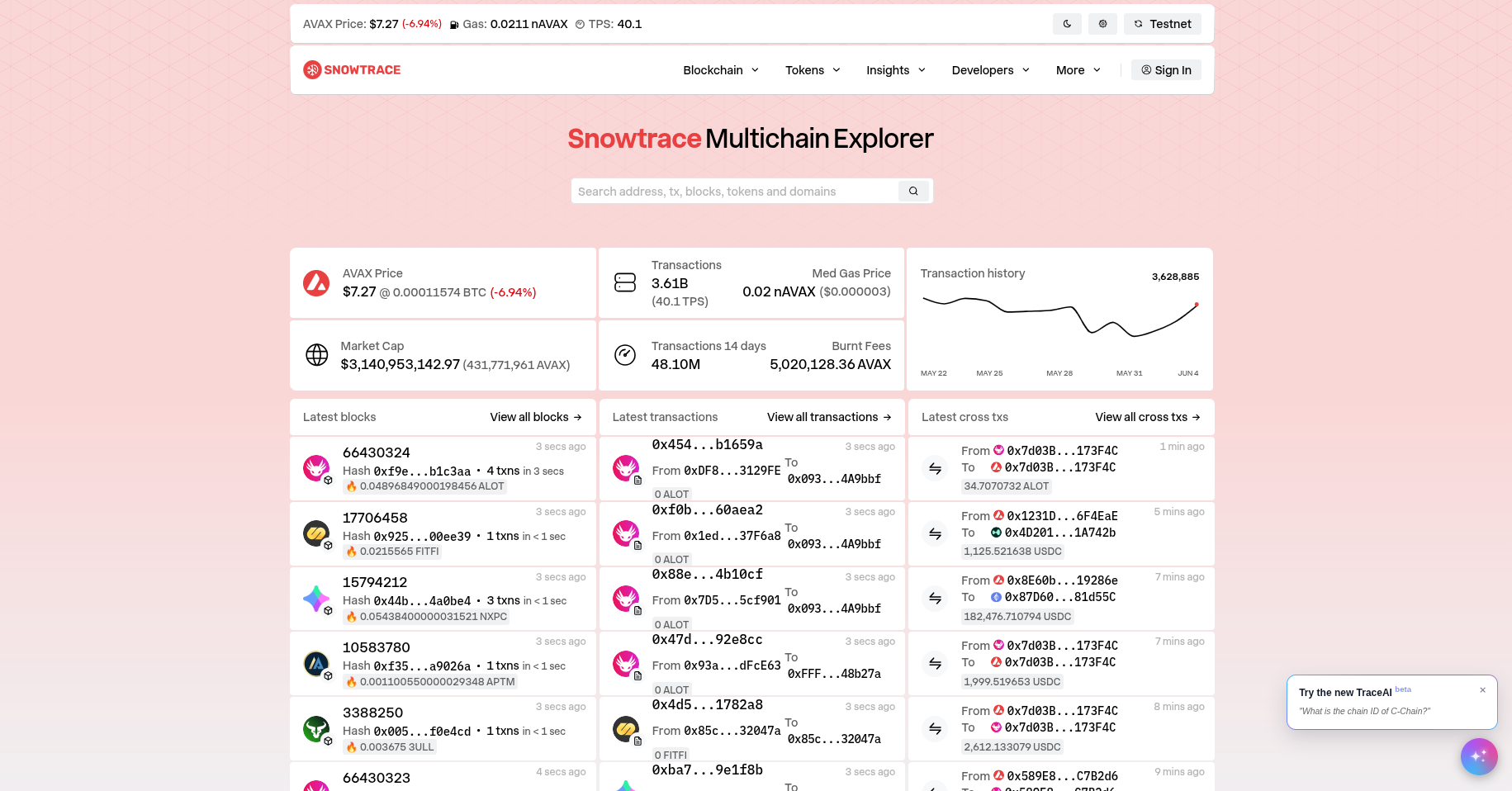
SnowTrace is the explorer designed for the Avalanche blockchain. It enables users to search AVAX transactions, token transfers, and smart contract activity.
What You Can Do:
- Track AVAX transactions
- View token transfers
- Analyze DeFi activity
- Verify smart contracts
- Monitor network performance
When interacting with Avalanche-based decentralized applications, SnowTrace helps users verify every transaction directly on-chain.
Comparison of Popular Blockchain Explorers
| Explorer | Blockchain | Best For |
|---|---|---|
| Blockchain.com Explorer | Bitcoin | BTC transactions and wallet tracking |
| Etherscan | Ethereum | ETH, NFTs, smart contracts |
| BscScan | BNB Chain | BEP-20 tokens and DeFi |
| Solscan | Solana | SOL transactions and staking |
| PolygonScan | Polygon | MATIC transactions and NFTs |
| SnowTrace | Avalanche | AVAX transactions and DeFi |
Which Blockchain Explorers Are Used the Most?
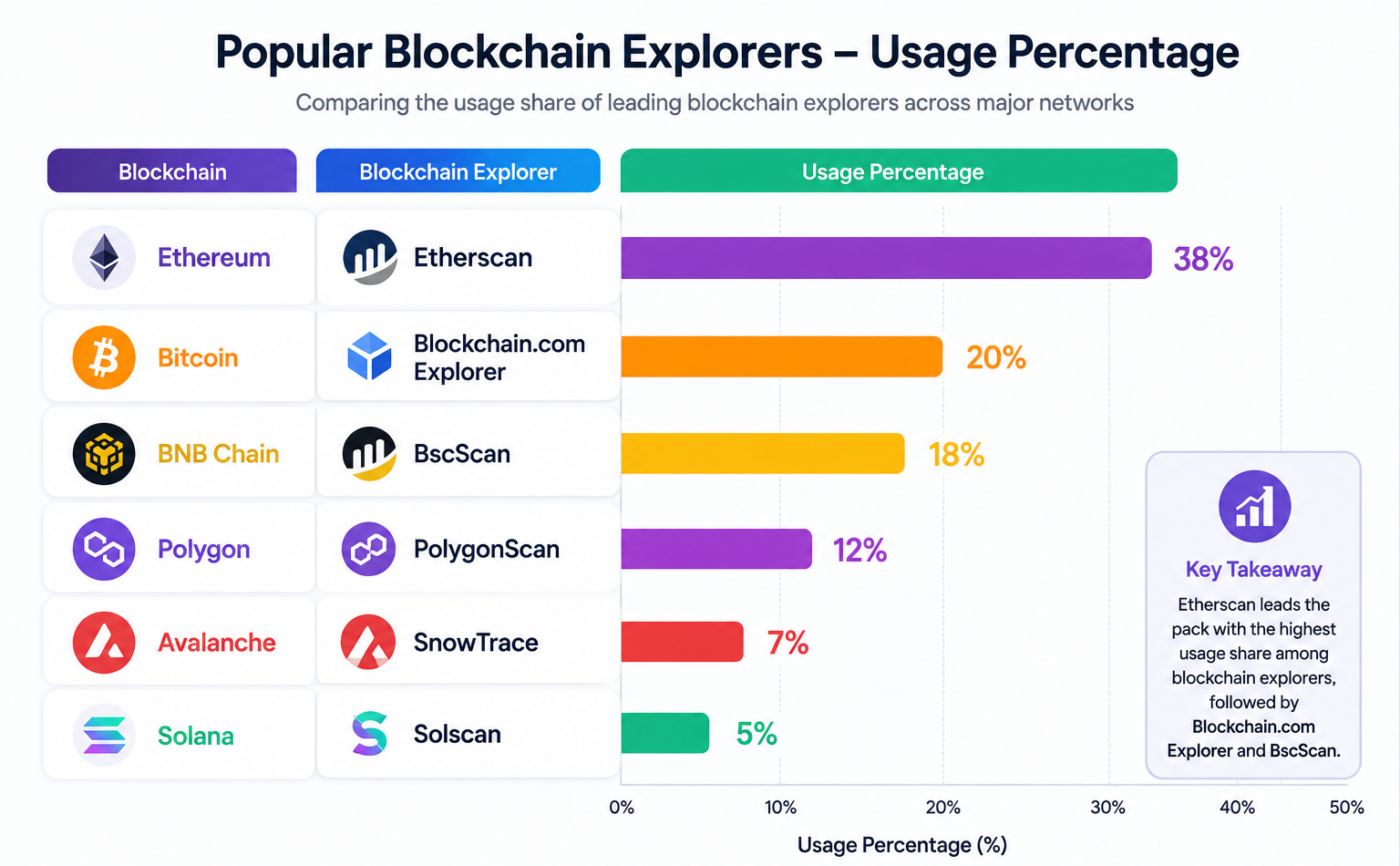
The chart above highlights some of the most widely used blockchain explorers across major blockchain networks. Etherscan leads as the preferred explorer for Ethereum, while Blockchain.com Explorer and BscScan are popular choices for Bitcoin and BNB Chain users.
PolygonScan, SnowTrace, and Solscan provide valuable tools for tracking transactions, wallet activity, and network data on their respective blockchains. Together, these explorers help users verify blockchain activity and access real-time on-chain information with transparency.
How Does a Blockchain Explorer Work?
Blockchain explorers connect to blockchain nodes and continuously collect information from the network. This information is then organized into a searchable database that users can access through a website.
Whenever a new transaction or block is added to the blockchain, the explorer updates its records and displays the latest information.
Simple Process
- A transaction is sent.
- The blockchain records the transaction.
- The explorer reads the blockchain data.
- The explorer indexes the information.
- Users search and view the data.
Think of it this way: the blockchain acts as a giant public notebook, while the explorer acts as a search tool that helps users find specific pages and entries within that notebook.
Real-World Example:
When someone sends Bitcoin, the transaction is permanently recorded on the Bitcoin blockchain. A blockchain explorer reads this information and displays it in an easy-to-understand format.
Key Terms You Should Know
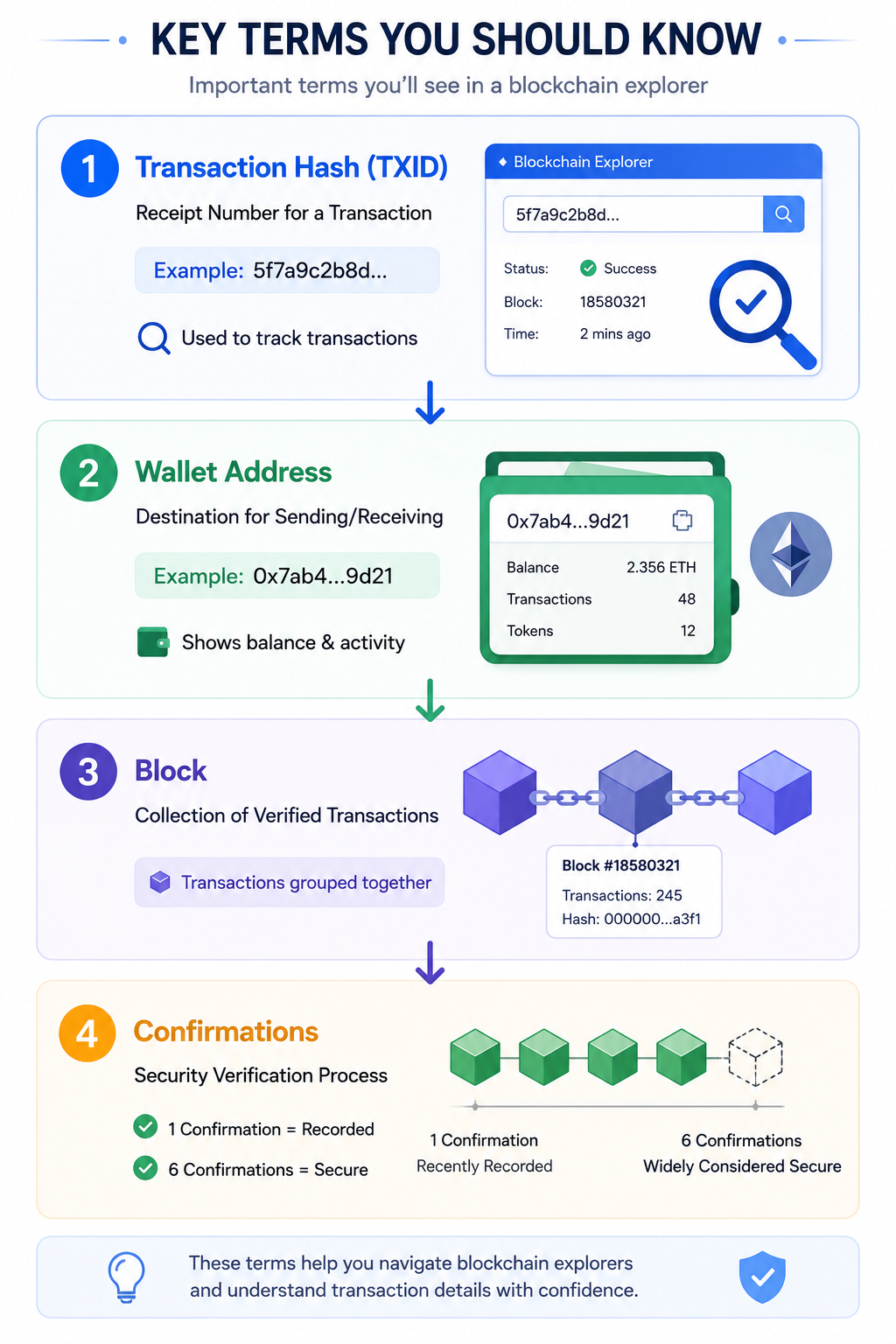
Before using a blockchain explorer, it helps to understand a few important terms that frequently appear throughout explorer interfaces.
1. Transaction Hash (TXID)
A transaction hash, often called a TXID, is a unique identifier assigned to every blockchain transaction. It works much like a receipt number that allows you to locate a specific transaction.
Real-World Example:
After sending Bitcoin, your wallet may display a long string such as 5f7a9c2b8d…. This is your transaction hash, and you can paste it into a blockchain explorer to track the transaction.
2. Wallet Address
A wallet address is the location where cryptocurrency is sent or received. Every wallet has its own unique address.
Real-World Example:
An Ethereum wallet address may look like 0x7ab4…9d21. Searching this address in a blockchain explorer can reveal wallet balances, transaction history, and token holdings.
3. Block
Transactions are grouped together into blocks before being added to the blockchain. Each block contains a collection of transactions that have been validated by the network.
Imagine a notebook where every page represents a block and every line on the page represents a transaction. The blockchain continues adding pages forever.
4. Confirmations
Confirmations represent the number of blocks that have been added after a transaction. Generally, the more confirmations a transaction has, the more secure it is considered.
Real-World Example:
- 1 confirmation = recently recorded
- 6 confirmations = widely considered secure
Understanding Transaction Status
When checking a transaction in a blockchain explorer, you may encounter different status labels.
- Pending: The transaction has been submitted but is still waiting to be processed by the network.
- Confirmed: The transaction has been successfully included in a block and recorded on the blockchain.
- Failed: The transaction could not be completed successfully and was rejected by the network.
- Dropped: The transaction was removed from the network before receiving confirmation.
For example, an Ethereum transaction with a very low gas fee may remain pending for an extended period.
How to Use a Blockchain Explorer (Step-by-Step)
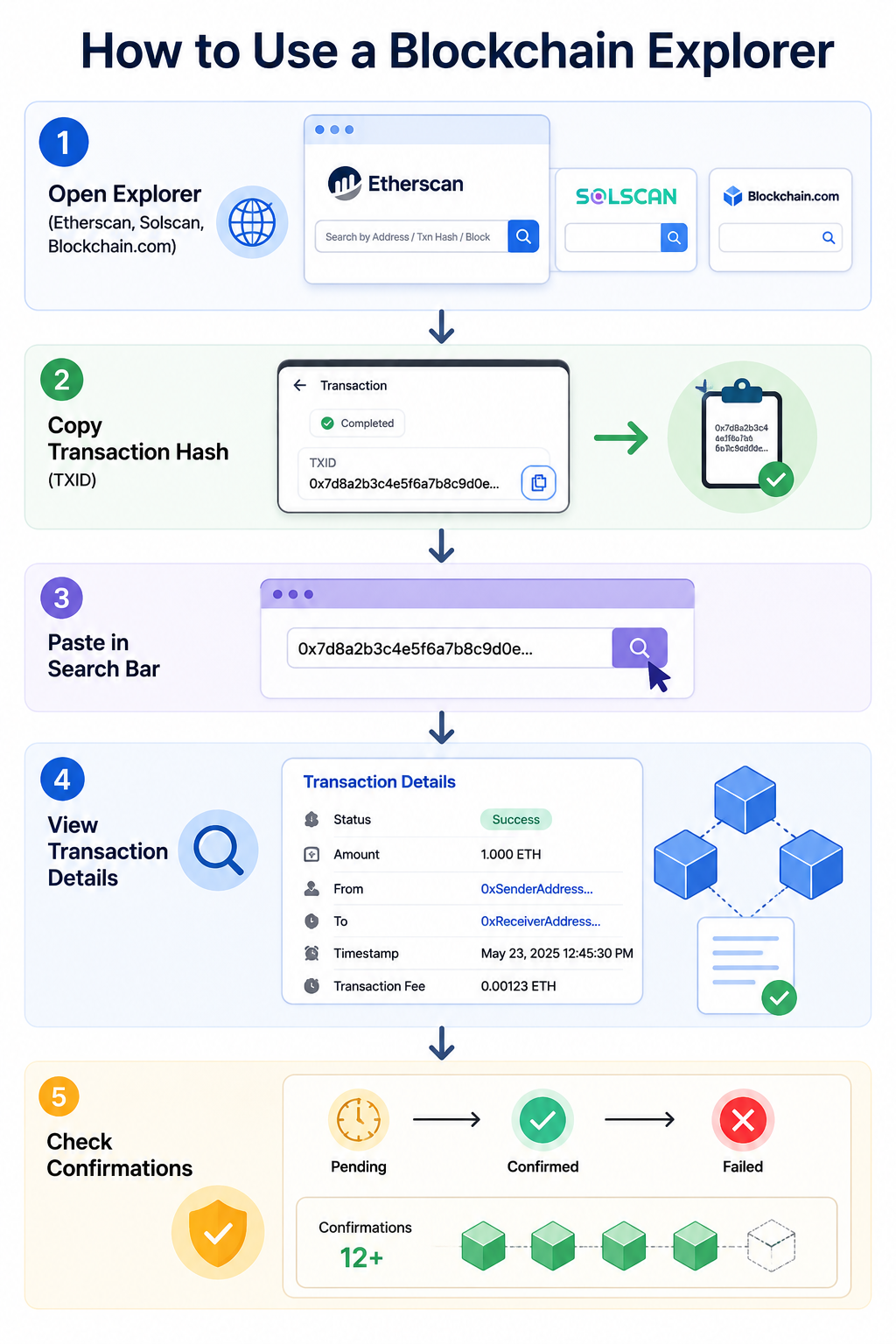
Using a blockchain explorer is straightforward, even for beginners. Follow these simple steps to track a transaction.
Step 1: Open a Blockchain Explorer
Choose the explorer that matches the blockchain you want to inspect.
- Ethereum → Etherscan
- Bitcoin → Blockchain Explorer
- Solana → Solscan
Step 2: Copy a Transaction Hash
Most cryptocurrency wallets provide a transaction ID after sending funds. This identifier is usually a long string of letters and numbers.
Step 3: Paste It Into the Search Bar
Open the blockchain explorer, paste the transaction hash into the search field, and press Enter.
Step 4: View Transaction Details
The explorer will display important information about the transaction.
- Transaction status
- Amount sent
- Sender address
- Receiver address
- Timestamp
- Transaction fee
Step 5: Check Confirmation Status
Review the transaction status to determine whether it is pending, successful, or failed. You can also see how many confirmations the transaction has received.
Real-World Example:
If you send 1 ETH to a friend, Etherscan allows you to verify that the transaction was successful, shows the amount sent, displays the gas fee paid, and records the exact transaction time.
How to Verify a Crypto Payment
One of the most common uses of a blockchain explorer is verifying cryptocurrency payments.
- Copy the transaction hash from your wallet or exchange.
- Open the correct blockchain explorer.
- Paste the transaction hash into the search bar.
- Review the transaction details.
- Check the confirmation count and transaction status.
You should verify the amount sent, sender address, recipient address, timestamp, and confirmation status.
How to Check a Wallet Address
Blockchain explorers can also be used to track wallet activity and view wallet balances.
- Copy a wallet address.
- Paste it into the explorer search bar.
- Open the wallet page.
The wallet page typically displays balances, transaction history, token holdings, and NFT collections on supported networks.
Real-World Example:
Many investors monitor large cryptocurrency holders, often called whales. By searching public wallet addresses, users can observe major transactions and holdings.
Users should carefully verify wallet addresses before sending funds. Address poisoning attacks can make fraudulent addresses appear similar to legitimate ones in transaction histories. This tactic gained attention following reports of address poisoning attacks affecting Ethereum users.
Reviewing wallet activity can sometimes reveal suspicious transactions or unauthorized token movements. Blockchain explorers are often used to investigate incidents such as this $1.76 million USDC phishing attack, where attackers abused permit signatures to drain funds from a user’s wallet.
How to View Blocks
Blockchain explorers also allow users to inspect individual blocks. A block page contains detailed information about the transactions included in that block.
- Block number
- Timestamp
- Number of transactions
- Block reward
- Validator or miner information
Real-World Example:
A Bitcoin block may contain thousands of transactions that were processed together before being added to the blockchain.
How to Check Gas Fees
On smart contract blockchains such as Ethereum, users must pay gas fees to complete transactions. Blockchain explorers display current gas prices as well as historical fee data.
- Current gas prices
- Historical gas costs
- Transaction fees
Real-World Example:
If Ethereum gas fees are unusually high, you may decide to wait until network activity decreases before sending a transaction.
Why Do Gas Fees Change?
Gas fees are determined by network demand. When many users are trying to perform transactions simultaneously, fees increase.
Think of it like traffic on a highway:
- Low traffic = Lower gas fees
- Heavy traffic = Higher gas fees
Monitoring gas fees through a blockchain explorer can help users choose a more cost-effective time to make transactions.
Common Uses of Blockchain Explorers
People use blockchain explorers every day for a variety of purposes. These tools are valuable for both beginners and experienced cryptocurrency users.
- Verify crypto payments
- Check wallet balances
- Research tokens
- Investigate suspicious transactions
- Monitor whale wallets
- Track NFT activity
- Analyze blockchain networks
- Learn blockchain technology
How Blockchain Explorers Help Prevent Scams
Blockchain explorers can help users independently verify information and avoid certain types of cryptocurrency scams.
- Verify token contract addresses
- Confirm payments
- Inspect wallet activity
- Check transaction history
- Research suspicious transfers
Instead of relying on screenshots or claims from other users, blockchain explorers allow anyone to verify information directly on the blockchain.
Blockchain explorers can help investigate phishing scams, suspicious transactions, and stolen funds. For example, a recent USDC phishing attack on Ethereum resulted in a $1.76 million loss, while investigators used on-chain data to track assets involved in the Gondi NFT exploit.
Blockchain explorers can also help users investigate suspicious transactions and track the movement of funds after security incidents. For example, researchers used on-chain data to follow assets moved during the Drift Protocol exploit, as funds were bridged from Solana to Ethereum.
Advantages of Blockchain Explorers
One of the biggest advantages of blockchain explorers is transparency. Anyone can independently verify blockchain activity without relying on a third party.
Blockchain explorers also improve security by allowing users to confirm transactions directly on the blockchain. In addition, they serve as excellent educational tools that help beginners understand how blockchain networks operate.
Limitations of Blockchain Explorers
Although blockchain explorers are extremely useful, they also have limitations. Most blockchain addresses are pseudonymous, meaning users can see wallet addresses but not necessarily the real-world identity behind them.
Explorer data can sometimes appear complex to beginners, especially when dealing with smart contracts and advanced transaction details. Additionally, explorers are network-specific, meaning a Bitcoin explorer cannot search Ethereum transactions.
Common Mistakes Beginners Make
- Using the wrong blockchain explorer
- Searching with an incorrect transaction hash
- Assuming a pending transaction is lost
- Sharing private keys with others
- Using fake blockchain explorer websites
- Failing to verify token contract addresses
Avoiding these mistakes can improve security and reduce confusion when using blockchain explorers.
Beginner Tips for Using Blockchain Explorers
- Double-check wallet addresses before sending funds
- Verify transaction status before contacting support
- Use the correct explorer for the blockchain
- Learn terms like TXID and confirmations
- Bookmark trusted explorers
- Never share private keys
- Verify token contract addresses before investing
Summary
- A blockchain explorer is a search engine for blockchain data.
- It helps users view transactions, wallets, blocks, and token information.
- Every major blockchain has its own explorer.
- Transaction hashes can be used to track transfers.
- Wallet addresses can be searched to view balances and activity.
- Explorers improve transparency and trust in blockchain networks.
- They are essential tools for crypto users, investors, developers, and beginners.
Conclusion
A blockchain explorer is one of the most important tools in the cryptocurrency ecosystem. It allows anyone to inspect blockchain activity, verify transactions, check wallet balances, and understand how decentralized networks operate.
The best part is that you do not need to be a developer or blockchain expert to use one. With a simple search, you can explore transactions, monitor wallets, and learn exactly what is happening on a blockchain in real time.
If you are new to cryptocurrency, learning how to use a blockchain explorer is one of the first and most valuable skills you can develop. It provides greater transparency, confidence, and control over your digital assets.
FAQs
1. Can I see someone’s name through a blockchain explorer?
No. Most blockchain explorers display wallet addresses rather than personal identities.
2. Is a blockchain explorer free to use?
Yes. Most blockchain explorers are completely free and accessible to anyone.
3. Can I cancel a blockchain transaction?
In most cases, confirmed blockchain transactions cannot be reversed or canceled.
4. Can blockchain explorers see my private key?
No. Private keys are never displayed or exposed through blockchain explorers.
5. Which blockchain explorer should I use?
Use the explorer that matches the blockchain network you are using. For example, Ethereum users typically use Etherscan, while Bitcoin users use Blockchain.com Explorer.
Disclaimer: Cryip's content is strictly for educational and informational purposes and does not constitute financial, legal, or investment advice. Cryptocurrency involves significant risk, and readers assume full responsibility for their own financial decisions. Asset references are never endorsements.
To make complex crypto topics accessible to readers at all experience levels, our team uses AI tools strictly to refine language, correct grammar, and simplify terminology. AI is never used to draft facts, source information, or form conclusions. Every article is fact-checked and approved by a human editor before publication. Read our full AI Use & Content Policy.